
Skills Suite
Receive a concierge skills suite that packs your digital professional life, moves it to Claude Code, and sets it up exactly where it belongs.
You’ve already decided to make the switch. You know the agentic paradigm is where your work needs to go.
Here’s what happens when you actually sit down to do it: Claude Code can’t see anything you’ve built.
Your AI chat history.
Your Google Docs.
Your meeting transcripts.
The voice guide you refined over weeks.
The frameworks buried in hundreds of conversations.
All of it lives in the cloud. But Claude Code lives on your computer. Those two worlds don’t talk to each other.
When you switch paradigms, you start from zero.
If you’ve ever changed AI platforms, you know a smaller version of this feeling. Remember how ChatGPT knew your writing voice, your client list, your preference for bullet points over paragraphs?
Then you opened Claude for the first time and it was like talking to a stranger. Every trained preference: gone. You spent months rebuilding that context from scratch.
Now multiply that by your entire professional life.
If you’ve ever moved to a new home, you know how overwhelming the bigger version of this feeling can get.
You’re standing in your old place, keys to the new one already in your pocket, and you open the hall closet.
You forgot how much stuff was in there.
Boxes from the last move. A drawer full of cables you’ve been meaning to sort. Three winter coats you should’ve donated years ago. And this is just one closet. There’s still the kitchen, the bookshelves, the filing cabinet, the bathroom drawers. Every surface in every room has to be emptied, wrapped, boxed, labeled, loaded, driven across town, and put somewhere in the new place.
The moving company you called will load boxes onto the truck and unload them at your new place. That’s it.
What goes in the boxes?
That’s your job.
Where does it go in the new place?
Also your job.
Did you remember to label which box has the coffee maker?
You’ll find out tomorrow morning when you’re tearing through cardboard at 6am because you can’t remember which one you packed it in.
You know exactly what this feels like. Packing takes three times longer than you expected. On moving day, you realize you forgot an entire shelf. Once you’re in your new home, you’ll live out of boxes for days (or weeks) because unpacking is somehow even more draining than packing was.
That’s the position you’re in right now with your digital life.
Your chat history is the hall closet. Your Google Docs are the kitchen cupboards. Your Substack archive and your LinkedIn posts are the filing cabinet. Every account you use in your professional life contains valuable information that needs to be packed, labeled, and moved to a new place before Claude Code can use it.
And just like a physical move, you could do it yourself. Go platform by platform: Claude, ChatGPT, Gemini, Zoom, LinkedIn, Substack. Navigate each export process. Download raw data in formats you’ve never seen. Organize everything into folders. Convert it into something Claude Code can read. Build a workspace from scratch.
For someone who isn’t technical, that’s 60+ hours of work. Most people open the first settings page, see what they’re in for, and close the tab. Three months later, they’re still in chat.
Now imagine a completely different moving experience.
It starts before a single box gets packed. A personal coordinator comes to your home and walks through every room with you. They learn what matters most, what’s fragile, what’s valuable, what you use every day. They build a plan around your priorities, not a generic checklist.
Then a team arrives and packs everything. Not just the furniture. Everything. Your dishes are individually wrapped. Your artwork gets custom crating. Your files are organized and labeled.
You don’t touch a single box.
But the real difference is what happens at the other end.
You walk into your new home, and it’s finished. Your books are on the shelves, organized the way you had them. Your clothes are hung in the closet. Your dishes are in the kitchen cabinets. The packing materials are gone. The furniture is assembled and placed. Someone made the beds.
The best concierge services go even further. Because you’re moving into a bigger space, they don’t just replicate what you had. They help you use the new space well. A layout optimized for how you actually live. You don’t just move. You upgrade.
White-glove moving companies describe what they do as: reassembling your life inside your new home. You walk through the front door, and everything is where it should be. Ready to live in. Day one.
That’s the experience we built for your digital life.
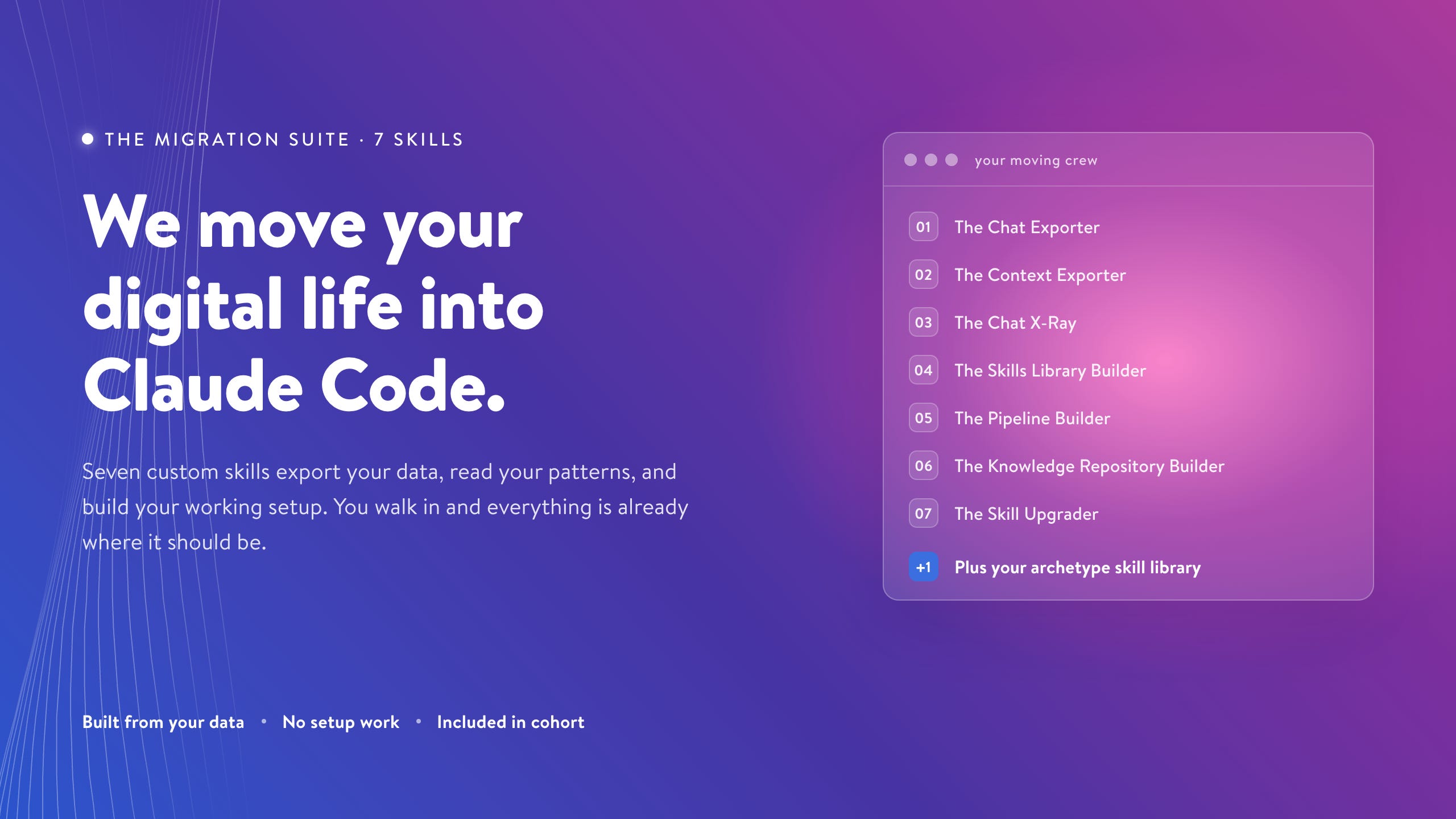
We spent hundreds of hours building seven custom skills that handle every step of the migration from your chat accounts to Claude Code. They:
export your data
analyze your patterns
build your workspace
turn your most-repeated prompts into one-command tools
organize your knowledge
keep improving your systems even after the move is done
These skills don’t exist anywhere else. We built them specifically for members of the Agentic Academy for Knowledge Work.
What We Mean by a Skill
A skill is a reusable tool that Claude uses to handle a recurring job.
In chat, you usually have to explain the job every time: what the task is, what context matters, what style to use, what format you want, and what mistakes to avoid.
A skill packages that instruction so Claude can run the process again without you rebuilding the whole setup from scratch.
For example:
A prompt asks Claude to draft a client follow-up.
A skill tells Claude how you write follow-ups, what client material to check, what tone to use, what sections to include, and what quality bar the answer has to meet.
That’s why skills matter for migration. We’re not only moving your old conversations into a new folder. We’re turning the repeatable parts of your work into reusable tools Claude Code can run.
Meet Your Moving Crew: Six Skills That Transfer Your Entire Digital Life Into Claude Code
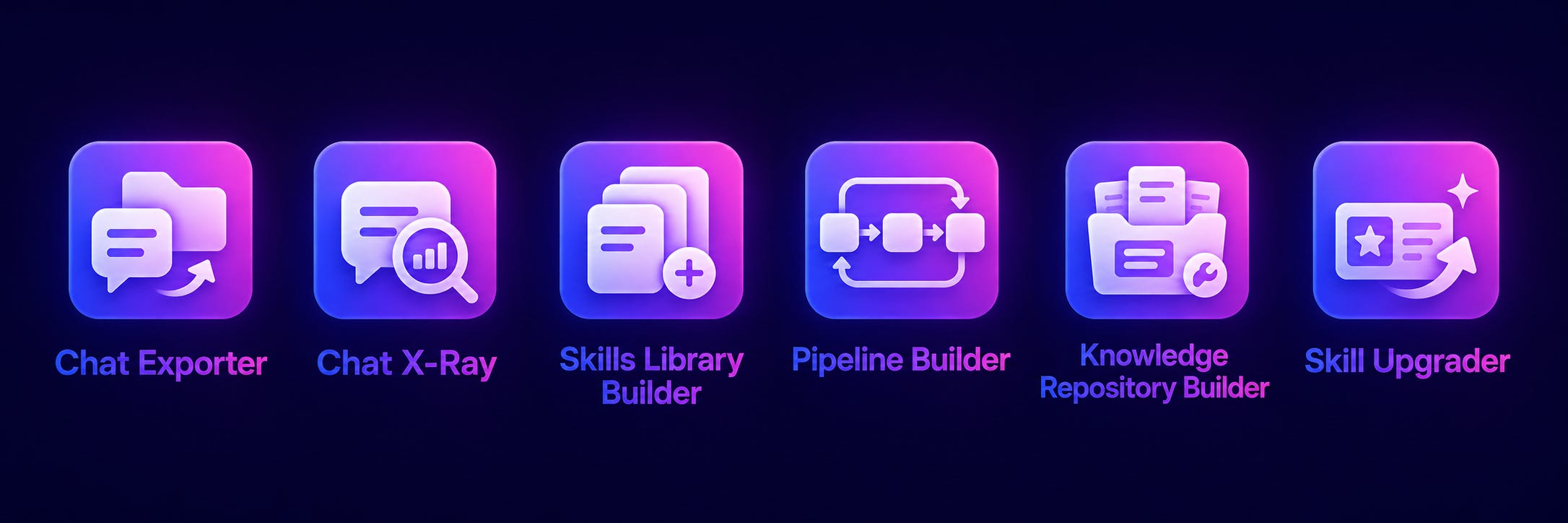
The Concierge Migration Suite is a set of six tools that handle every step of the migration from AI chat to Claude Code.
Think of them as your personal moving crew. Each one has a specific job, and together they cover the entire process from first box to finished home. Alongside the migration suite, you also get an archetype Skill Library designed specifically for the kind of work you actually do.
Here is what is in the suite:
The Chat Exporter exports your complete conversation history from Claude, ChatGPT, and Gemini, converting raw platform data into clean, organized files that Claude Code can work with.
The Chat X-Ray is a comprehensive, AI-powered analysis that reads your entire chat history and produces a personalized report showing you exactly how you use AI, where your time is going, what is costing you, and what changes when you move into Claude Code.
The Skills Library Builder takes the patterns the Chat X-Ray identifies and automatically builds them into reusable Claude Code skills, so the prompts you have been re-typing for months become one-command tools you never have to explain again.
The Pipeline Builder identifies workflows that were fragmented across dozens of separate chat conversations and consolidates them into single, repeatable pipelines that run in Claude Code with full continuity.
The Knowledge Repository Builder organizes all of your exported data, frameworks, voice guides, methodologies, and institutional knowledge into a structured system that Claude can search, reference, and draw on automatically.
The Skill Upgrader analyzes any skill you have built, identifies the mental models and thinking patterns that would make it perform better, and rewrites the skill with those improvements integrated, so your tools get smarter every time you use them.
If You Hired Someone to Do This, Here’s the Invoice You’d Get
Let’s say you decided to hire an AI workflow consultant to do what the Concierge Migration Suite does.
First, good luck finding one. Personal AI migration (exporting your digital life, analyzing your patterns, building a Claude Code workspace around your actual work) is a category that doesn’t exist yet. The consultants who come closest are AI workflow specialists, and they charge $150 to $600 per hour.
Here’s the math for what each piece of the migration suite would cost at consultant rates:
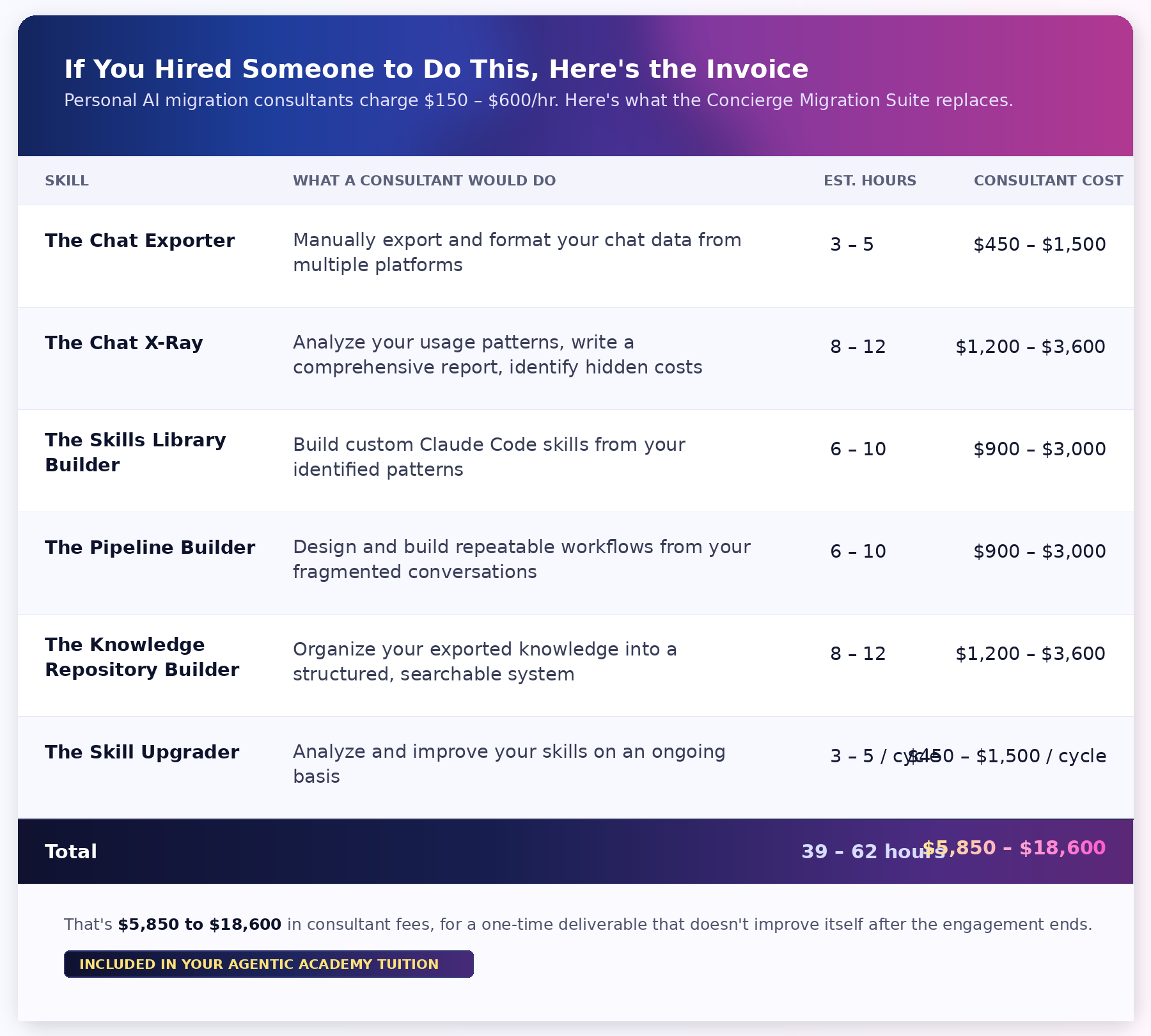
That’s $5,850 to $18,600 in consultant fees. For a one-time deliverable that doesn’t improve itself after the engagement ends.
And that consultant, however skilled they are at AI workflow design, doesn’t know your work. They’d need additional hours just to understand your domain, your quality standards, and the patterns that matter in your specific context. The skills that make up your virtual moving crew figure all of that out from your own data.
The Concierge Migration Suite is included in your Agentic Academy tuition.
You get the full suite, all six skills, as part of the program. No additional cost. No upsell. It’s how we make sure that when you arrive in Week 1, you’re not starting from scratch. You’re starting from a workspace that already knows who you are and how you work.
This is the difference between participating in the Agentic Academy cohort and trying to learn Claude Code on your own.
On your own, Day 1 is a blank terminal and a vague sense of what you want to build.
In the Agentic Academy, Day 1 is a Claude Code environment that’s already been set up with your data, your patterns, your skills, and a clear roadmap for where to go next.
You walk in and everything is where it should be.
Ready to make the move? Join the Agentic Academy and the Concierge Migration Suite is included.
Option #1: 10-Week Cohort
Option #2: Ongoing
Option #3: Enterprise
Want to learn more about the skills? Keep reading…
What Your Moving Crew Does When They Show Up
The Concierge Migration Suite works in a specific order. Each Skill does one job and passes its output to the next.
First, everything is gathered for you: the Chat Exporter pulls your data out of the platforms where it’s been trapped.
Then you’ll see you what you’ve already done: the Chat X-Ray analyzes your entire history and builds a ready-to-use Claude Code workspace from it.
Next, the suite builds on your earlier work: the Skills Library Builder, the Pipeline Builder, and the Knowledge Repository Builder turn your patterns, processes, and accumulated knowledge into tools and systems.
And continuous improvement is built in: the Skill Upgrader improves your entire system whenever you ask it to.
This isn’t a toolkit you have to figure out how to assemble. It’s a process that runs in sequence and produces a working Claude Code workspace at the end. Your job is to show up. The suite handles the rest.
1. The Chat Exporter
Your AI conversations contain months of your thinking. Frameworks you developed through back-and-forth with Claude. Prompts you spent hours getting right. Insights that arrived mid-conversation and never got captured anywhere else.
The Chat Exporter gets all of it out. It works in two modes:
Manual mode takes you directly to the exact export page in each platform. No searching through settings menus, no guessing which submenu has the download option. You land on the right page and get step-by-step instructions for completing the export.
Cowork mode goes further: it tells Claude Cowork to start the export from each account you’re logged into. You initiate it and let it run.
What you get: Your complete AI chat history from Claude, ChatGPT, and Gemini, downloaded in clean formats that Claude Code can convert into markdown, Word, PDF, or whatever you need. All the insights, all the frameworks, all the carefully refined instructions you built in chat: out of the platforms and into your hands.
2. The Chat X-Ray
The Chat X-Ray reads your entire AI chat history and does two things that puts you several steps ahead when you move into Claude Code.
First, it shows you what your chat usage has actually been costing you. Second, it uses that analysis to build you a ready-to-use Claude Code workspace.
What the Chat X-Ray Reveals
This isn’t a quiz or a self-assessment. It’s a data-driven portrait of your actual AI behavior, drawn from your own conversations.
Your hidden costs. One early user discovered that 8% of everything they’d ever typed was pure context re-establishment. They’d typed the equivalent of an entire novel just to get Claude back up to speed.
Your repetition patterns. The analysis identifies every prompt you’ve copy-pasted or retyped across multiple conversations and clusters them by function. The same early user found that 43% of their conversations started with a re-pasted prompt template. Over 300 conversations that began by re-explaining something Claude should have already known.
Your trapped knowledge. The report audits the frameworks, methodologies, voice guides, and institutional knowledge buried in your chat history. That early user had built 15 distinct professional frameworks across months of conversations. None were accessible to any other conversation. Their personal voice guide had been recreated from scratch twice, four months apart, because the second conversation didn’t know the first one existed.
Your workflow fragmentation. That same user had a single editing project sprawled across 38 separate conversations over 84 days. In Claude Code, those 38 conversations would collapse to roughly 3 pipeline runs with full continuity preserved.
Your AI sophistication level. The report grades your current chat usage and identifies your Claude Code entry point. Most people are surprised: they’ve been building Claude Code-shaped workflows inside chat for months without realizing it.
Your #1 Claude Code project. Based on everything the analysis finds, the Chat X-Ray recommends the single highest-impact project for you to build in the cohort: a data-driven recommendation based on your actual patterns.
What the Chat X-Ray Builds
The Chat X-Ray doesn’t just show you a report and leave you to figure out what to do with it. It uses the analysis to build your starting workspace.
It produces a complete, ready-to-use Claude Code working folder, tailored to your archetype (content creator, coach/consultant, entrepreneur, or knowledge worker):
CLAUDE.md is your project home base, pre-seeded with your patterns, preferences, and working style. This file that already knows who you are because it was built from your own data.
chat-xray-report.md is the full analysis: your hidden costs, repetition patterns, voice profile, and automation opportunities, all in one document you can reference anytime.
start-here.md is your orientation and next steps. You never stare at your workspace wondering what to do first. This file tells you exactly where to begin.
The context/folder is the “understand me” layer. It contains your operator profile, your voice and style guide, your decision rules, and your domain map. All of it derived from your actual chat behavior. When Claude reads this folder, it already understands how you think, how you write, and how you make decisions.
project/project-brief.md is your recommended #1 project, scored and described in enough detail that you can hand it directly to Claude Code and start building.
material/ is a structured home for your real files, with a README that tells you exactly what to drop in and where.
Here’s what this means in practice. Most people who try Claude Code on their own start from a blank directory. They spend their first hours figuring out what to put in CLAUDE.md, how to organize their folders, which project to start with, and how to get Claude to understand their work. The Chat X-Ray skips all of that. You open your workspace and the foundation is already there: your context, your voice, your patterns, your project, your next step. All built from your data, not a generic template.
3. The Skills Library Builder
The Chat X-Ray identified the prompts you type over and over. The Skills Library Builder turns each one into a reusable Claude Code skill you can run with a single command.
It reads the Chat X-Ray’s analysis of your repeated prompt patterns and builds a working Claude Code skill from each one. Then it goes further: it looks at what you do in chat, identifies additional skills that would be useful based on your work patterns, and builds those too. Some of these skills may be specific to common projects you’re working on, not just generic task types.
What you get: A library of personalized skills, ready to install and use immediately. Skills built from YOUR patterns, for YOUR work, tuned to YOUR style. Plus additional skills the builder identified as opportunities you hadn’t thought to automate.
These aren’t generic skills that sort of fit your workflow if you squint. They’re built from the way you actually work.
The prompt you’ve been re-typing every Monday morning? It’s now a skill you invoke with one command.
The process you walk Claude through every time you prep for a client call? Automated.
The formatting instructions you paste at the end of every draft request? Built in.
These are your starting skills. The cohort will teach you how to build a new skill from scratch. But you don’t start from zero. You start with a library that’s already working for you.
4. The Pipeline Builder
If you’ve ever had a process that took three, four, or five chat conversations to complete, because each step needed different context, different instructions, and different reference material, that’s a pipeline. You’ve just been running it by hand, one conversation at a time, reassembling the context at every step.
The Pipeline Builder identifies these larger multi-step processes from your chat history: the workflows you were already running across multiple conversations without calling them workflows.
It suggests additional pipelines based on your work patterns and builds them, chaining steps together with your context, rules, and skills loaded at each stage. Processes that used to span five conversations over three days now run in one session with full continuity.
What you get: Pre-built pipelines based on processes you already do, now automated and repeatable. Plus suggested pipelines for workflows you might not have thought to automate.
Here’s why this matters for the cohort. Week 6 teaches you to build pipelines from scratch, so you understand how they work and can create new ones for anything you need.
But the Pipeline Builder gives you a head start: working pipelines you can study, use, and extend. You learn the principles by examining something that already runs, not by staring at an empty file trying to figure out where to begin.
5. The Knowledge Repository Builder
The Chat Exporter and Context Exporter got your data out. The Chat X-Ray analyzed it. The Skills Library Builder and Pipeline Builder turned your patterns into tools.
But the bulk of what you exported is still raw material sitting in files. Your frameworks, your insights, your published content, your meeting notes, your client conversations: potentially thousands of documents, none of them organized.
The Knowledge Repository Builder does the organizing for you. It processes all of your exported data (chat history, social content, meeting transcripts, professional communications) and organizes it into a structured knowledge repository with proper categorization.
What you get: An organized knowledge base that Claude can search, reference, and draw on automatically.
Your frameworks have permanent, findable homes instead of being buried in old conversations.
Your professional content is indexed and available for repurposing.
Insights from client and colleague conversations are captured and retrievable.
And here’s the part that makes the Knowledge Repository fundamentally different from anything you had in chat: it works across every Claude Code project you build.
Your information isn’t locked to a single workspace or siloed the way your chat conversations were. When you start a new project next month, your Knowledge Repository is already there. The insights from your coaching calls can inform your newsletter draft. Your content strategy can draw on your meeting notes. Everything talks to everything.
This is where the “bigger house” promise becomes real. In chat, your knowledge was trapped in individual conversations. In Claude Code with the Knowledge Repository, your knowledge is infrastructure. It persists. It’s searchable. It compounds.
6. The Skill Upgrader
Most tools are exactly as good the day you finish setting them up as they’ll ever be. The Skill Upgrader makes sure that’s not true for yours.
It looks at every skill in your Claude Code environment and finds ways to improve them. Not surface-level tweaks. Structural improvements that change the quality of what the skill produces.
The way it does this is by incorporating mental models: specific thinking patterns that make AI output better at the level of how it reasons, not just what words it uses.
Here’s what that looks like in practice. Say you build a client proposal skill. It works, but the output feels generic. You run the Skill Upgrader, and it identifies that the skill would benefit from progressive disclosure (don’t dump everything on the reader at once) and root cause analysis (diagnose the client’s real problem before proposing solutions). It rewrites your skill with those thinking patterns embedded. The next proposal it generates is structurally better, not just cosmetically different.
Or say you have a content drafting skill that produces solid first drafts but always misses your unique angle. The Skill Upgrader might integrate a contrarian reframe (identify the obvious take and invert it) and a specificity ladder (replace abstract claims with concrete examples at every level). Your next draft doesn’t just sound better. It’s built around better ideas that make a smarter argument.
This is one of the things that separates this program from what you’d build on your own. You’re not just learning Claude Code features. You’re embedding thinking patterns into your tools so that your version of Claude gets genuinely smarter about your work over time. Each improvement cascades: better skills feed better pipelines, which produce better output, which means better corrections, which feed back into even better skills.
The Skill Upgrader works during the cohort and on any skill you build afterward. The rest of the Concierge Migration crew finishes the job and heads out. But this one stays on call. Whenever you build a new skill, change a workflow, or want to level up something that’s already working, the Skill Upgrader is there.
In addition to the Concierge Migration Suite, you’ll also get the Archetype Skill Library we mentioned earlier, containing skills designed for the type of work you do.
You can use these pre-built skills as-is or customize them so they’re even tailored to your specific workflows (and we’ll help you with customization, too.)
10 Pre-Built Skills: Your Archetype Skill Library
The Skills Library Builder creates personalized skills from your own repeated patterns.
Your Archetype Skill Library gives you a ready-made starting set for the kind of work you actually do.
This matters because generic AI templates break down quickly.
A content creator does not need the same first skills as a consultant.
A founder does not need the same starting library as a project manager.
The underlying system is the same, but the work is different, so each person gets a 10-skill library matched to their archetype.
Content Creators
For newsletter writers, bloggers, podcasters, YouTubers, social writers, and creators.
Starter workflow: brain dump to content draft to edit to repurpose.
Skill Library:
Drafting from voice and archive.
Editing for voice and structure.
Repurposing across platforms.
Idea expansion from raw notes.
Headline and hook generation.
Research synthesis to brief.
Social post creation.
Content calendar planning.
Archive search and pattern surface.
Voice check and tone drift detection.
Coaches and Consultants
For solo consultants, coaches, agency owners, advisors, and service providers.
Starter workflow: client notes to meeting prep to proposal or follow-up.
Skill Library:
Client meeting prep brief.
Proposal drafting from past wins.
Meeting summary to action items.
Client follow-up email.
Case study and testimonial extraction.
Discovery call synthesis.
Deliverable formatting to standards.
Client research and context pull.
Onboarding doc creation.
Proposal and deliverable review.
Entrepreneurs
For founders, product managers, marketers, and operators.
Starter workflow: research and customer notes to positioning, strategy, content, or execution plan.
Skill Library:
Market research synthesis.
Customer interview to insight.
Positioning and messaging draft.
Competitor analysis.
Founder content for LinkedIn, investor updates, and customer emails.
Pitch and narrative refinement.
Customer language extraction for copy.
Strategic decision brief.
Decision memo with evidence.
OKR and priority drafting.
Knowledge Workers
For analysts, researchers, project managers, team leads, and corporate professionals.
Starter workflow: notes and project files to status report, decision memo, or action plan.
Skill Library:
Meeting notes to structured summary.
Status report from project files.
Research brief from multiple sources.
Stakeholder update tailored by audience.
Decision memo with options and tradeoffs.
Cross-project synthesis.
Executive summary generation.
Action item and owner extraction.
Cross-team report consolidation.
Weekly review and reflection.
The personalized skills you’ll create with the Skills Library Builder come from your own patterns.
The Skills Archetype Library gives you proven starting points for your kind of work. Together, they make Claude Code useful faster than either one would alone.
Don’t Start From Scratch. Start With Everything You’ve Already Built.
The Concierge Migration Suite doesn’t just move your digital life into Claude Code. Once it’s exported your data, it analyzes your patterns, builds your workspace, turns your habits into tools, organizes your knowledge into infrastructure, and shows you how to keep improving it.
You walk in and everything is where it should be. And six months from now, it’ll be better than it was on move-in day.
Join the Agentic Academy and get your move started with the Concierge Migration Suite.